Hey there! I'm Dhanush K S, an Electronics and Communication Engineering graduate from Bengaluru. I'm passionate about web development, DevOps, and staying up-to-date with the latest technologies. I love documenting my learning journey to help others and reinforce my own knowledge. Hands-on learning is my go-to approach as it allows me to personalize my education. Join me as I share my practical experiences and the lessons I've learned. Feel free to connect with me for collaboration or to share your insights!
When working with PostgreSQL as a DBA, DevOps, or SRE, one of the most important concepts you’ll deal with is how PostgreSQL manages memory and disk I/O. Today, I explored shared buffers, dirty pages, checkpointers, and even ran some hands-on queries to see how PostgreSQL behaves internally.
🧠 PostgreSQL Engine and Shared Buffers
PostgreSQL is built on a process-based architecture:
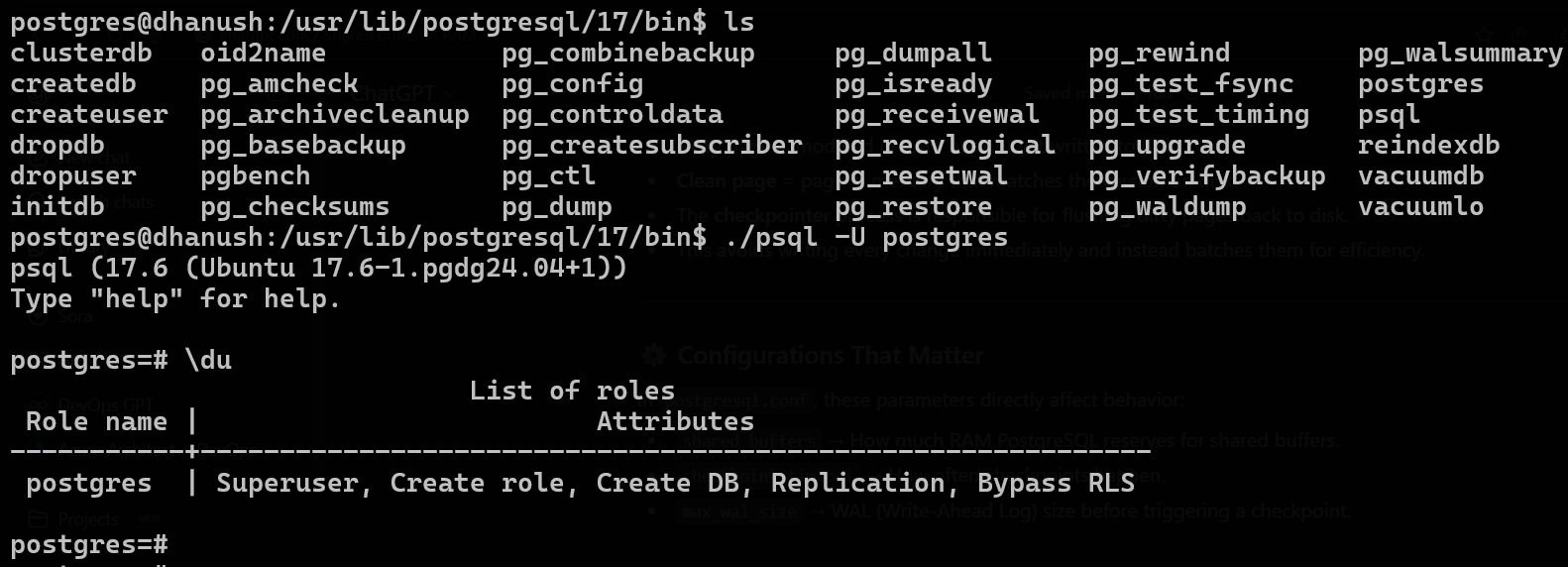
bin = brain 🧠 → the compiled executables (
postgres,psql,pg_ctl, etc.) at/usr/lib/postgresql/17/bindata = memory 🗄️ → the cluster’s actual database files (
/var/lib/postgresql/17/main)config = personality ⚙️ → how the brain behaves (
postgresql.conf,pg_hba.conf,pg_ident.conf,postgresql.auto.conf, etc) at/etc/postgresql/17/mainHere,
postgresis the default admin user. Thepsqlutility lets me interact with my databases using SQL or internal commands.Besides
psql, there are many binaries in this folder—each covering a specific function:postgres(main server binary)pg_ctl(used for starting/stopping/restarting the server)Many others for backup, maintenance, etc.
Data Directory
This is where all your actual database files live.

Conf files location
This holds all the key configuration files that affect PostgreSQL’s engine, security, memory settings, etc.

How PostgreSQL Handles Writes:
When you make changes (INSERT, UPDATE, DELETE), PostgreSQL doesn’t write directly to disk. It first writes to pages in shared memory (shared_buffers)—these are usually 8KB each.
* As more changes happen, modified pages are marked as dirty (changed in memory but not yet saved to disk).
* The checkpointer process runs periodically, flushing these dirty pages from memory to disk for durability. Until then, the database files on disk and the memory cache may be out-of-sync.
* Shared buffers optimize performance by caching frequently accessed pages in RAM and evicting old pages as needed.
I wanted to see what’s actually in PostgreSQL’s memory cache right now, so I ran:
  CREATE EXTENSION IF NOT EXISTS pg_buffercache;

  SELECT relname AS table_name, count(*) AS pages_in_memory, isdirty AS dirty FROM pg_buffercache JOIN pg_class ON pg_buffercache.relfilenode = pg_class.relfilenode GROUP BY relname, isdirty ORDER BY relname;
```
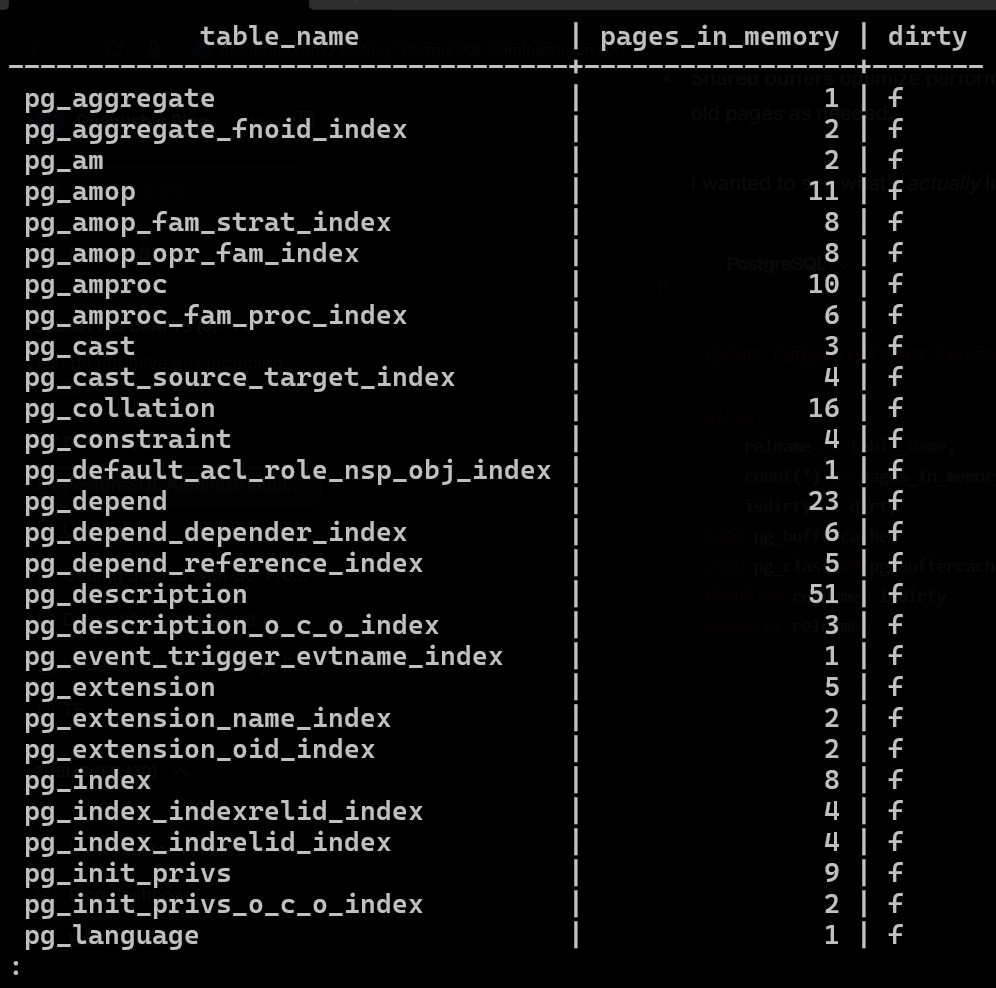
What this tells me:
* table_name: Which tables/indexes are cached in memory
* pages_in_memory: How many pages (8KB each) are cached for each object
* dirty: Is the page dirty (
t) or clean (f)?Observations:
* Not every table or index is fully cached—just those recently used
* Even system catalogs and indexes appear, since PostgreSQL uses them constantly
* Dirty pages (
t) mean they’ve been changed and still need to be written to disk
Dirty Pages vs WAL (Write-Ahead Log) – Key Differences
| Aspect | Dirty Page | WAL File |
| What it is | A page in memory (shared_buffers) that has been modified but not yet written to disk | A sequential log of all changes (inserts, updates, deletes) before they are applied to data files |
| Location | RAM (shared_buffers) | Disk (pg_wal directory) |
| Purpose | Hold modified data temporarily | Ensure durability & recovery in case of crash |
| When written | By background writer or checkpointer | Written continuously before the corresponding data page is flushed |
| Size | 8 KB (per page) | Varies; WAL is append-only, grows with changes |
How They Work Together
You run an
UPDATE→ page in memory is dirty.The change is also recorded in WAL immediately.
WAL ensures that if PostgreSQL crashes before the dirty page is flushed, it can replay the WAL and recover the change. It logs enough detail to redo the action if needed.
WAL can restore your database to a consistent state even if dirty pages never made it to disk.
Later, background writer/checkpointer flushes the dirty page to disk.
What is the Checkpointer in PostgreSQL?
The checkpointer is a background process spawned by PostgreSQL.
Its main job: periodically write all dirty pages from memory (shared_buffers) to disk and mark a checkpoint in the WAL.
Why Do We Need Checkpoints?
Crash Recovery
On restart, PostgreSQL replays WAL only from the last checkpoint instead of from the very beginning.
This keeps recovery time short.
Data Durability
- Dirty pages (changes in RAM) must eventually reach disk, otherwise your DB would be at risk of losing changes if RAM is wiped.
Manage Dirty Buffers
- Keeps shared_buffers from filling up with too many dirty pages.
When Does a Checkpoint Happen?
A checkpoint is triggered in these cases:
Time-based (most common)
Controlled by
checkpoint_timeout(default: 5 minutes).Every 5 minutes, a checkpoint runs automatically.
WAL size-based
Controlled by
max_wal_size.If WAL grows too large, a checkpoint is forced to keep logs under control.
Manual
CHECKPOINT;- A superuser can force it.
Server Shutdown
A checkpoint is done automatically on a clean shutdown.
What Happens During a Checkpoint?
Checkpointer process is signaled.
It:
Flushes all dirty pages from shared_buffers → data files on disk.
Writes a checkpoint record into WAL (like a bookmark).
Ensures all WAL records before that point are also flushed to disk.
After this:
PostgreSQL knows it can start recovery from this checkpoint if a crash happns.
Key Parameters for DBAs
checkpoint_timeout→ max time between checkpoints (default 5min).max_wal_size→ max WAL before checkpoint forced.checkpoint_completion_target→ spreads writes to avoid I/O spikes (default 0.9).
Difference Between Background Writer and Checkpointer
1. Background Writer
Runs continuously in the background.
Its job: write some dirty pages to disk little by little, so that client backends don’t get blocked when they need a clean buffer.
It does not guarantee all dirty pages are written.
Think of it as housekeeping → keeps the memory buffer pool (shared_buffers) from being filled with too many dirty pages.
👉 It smooths out I/O load between checkpoints.
SELECT * FROM pg_stat_bgwriter;
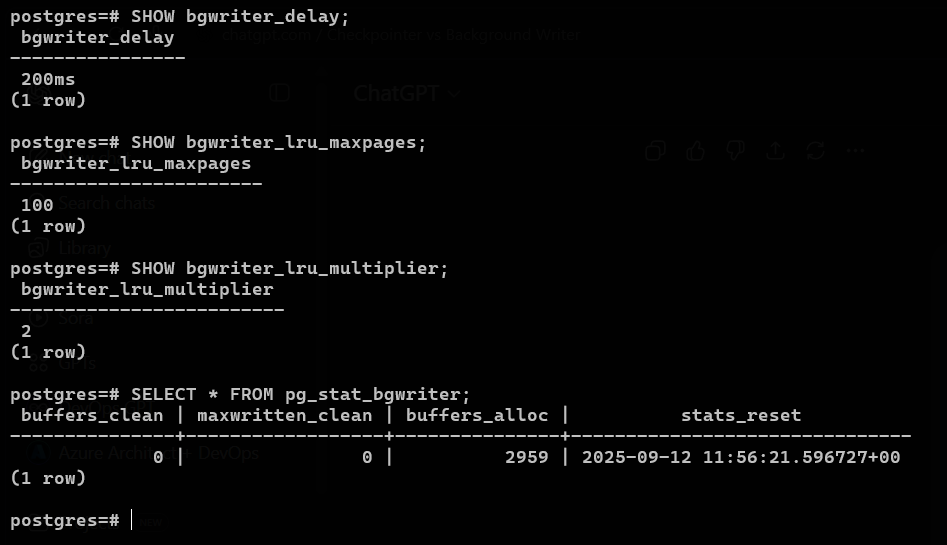
buffers_clean = 0→ background writer hasn’t flushed any pages yet.maxwritten_clean = 0→ confirms the background writer hasn’t written anything in a batch.buffers_alloc = 2959→ your backends have allocated 2959 dirty pages (pages in shared buffers that need flushing).1️⃣
bgwriter_delay = 200msThis is how often the background writer wakes up to do its work.
200ms = wakes up 5 times per second.
So the background writer is active, but there might not have been enough dirty pages for it to flush yet, or each cycle is limited by
lru_maxpages(next).
2️⃣ bgwriter_lru_maxpages
This is the max number of pages the background writer can write per cycle from the LRU list.
For example, if
bgwriter_lru_maxpages = 100, each time the background writer wakes up, it scans the LRU list and flushes up to 100 dirty pages starting from the least recently used.
3️⃣ bgwriter_lru_multiplier
This allows the background writer to scale up if the buffer pool is dirtier than normal.
For example, with
bgwriter_lru_multiplier = 2:- If there’s a lot of dirty pages, the writer can flush up to
100 × 2 = 200pages per cycle.
- If there’s a lot of dirty pages, the writer can flush up to
It still writes in LRU order, just more pages per cycle to catch up.
LRU = “Least Recently Used”
PostgreSQL keeps all active data pages in shared_buffers (RAM).
Pages in memory can be clean (already written to disk) or dirty (modified in RAM, not yet on disk).
The background writer uses an LRU algorithm to decide which dirty pages to write back to disk.
How it works:
It scans the shared_buffers in LRU order — i.e., it starts with the pages that haven’t been used recently.
Writing the least recently used dirty pages ensures:
Frequently used pages stay in memory (hot pages).
Old/unused pages get flushed to disk to free up space.
This prevents memory from filling up with dirty pages and reduces I/O spikes.
2. Checkpointer
Runs periodically (or when forced).
Its job: write all dirty pages to disk and mark a checkpoint in WAL.
Guarantees that up to that point, all changes are safely on disk.
Ensures crash recovery doesn’t take forever.
👉 It’s the safety mechanism → syncs memory and disk to a consistent state.
SELECT num_timed, num_requested, restartpoints_timed, restartpoints_req, restartpoints_done,
       write_time, sync_time, buffers_written, stats_reset
FROM pg_stat_checkpointer;

PostgreSQL Checkpointer vs Background Writer Stats
| Component | Column | Value | Meaning |
Checkpointer (pg_stat_checkpointer) | num_timed | 213 | Number of automatic (timed) checkpoints since stats reset. |
num_requested | 0 | Number of manually requested checkpoints. | |
restartpoints_timed | 0 | Number of timed restartpoints (used for logical replication; not relevant here). | |
restartpoints_req | 0 | Number of requested restartpoints. | |
restartpoints_done | 0 | Number of completed restartpoints. | |
write_time | 203,620 ms | Total time spent writing dirty pages to disk during checkpoints. | |
sync_time | 1,205 ms | Total time spent waiting for fsync to confirm pages persisted. | |
buffers_written | 1,997 | Total number of pages written to disk by checkpoints. | |
stats_reset | 2025-09-12 11:56:21 | Timestamp when checkpointer stats were last reset. | |
Background Writer (pg_stat_bgwriter) | buffers_clean | 0 | Total number of buffers written by the background writer. |
maxwritten_clean | 0 | Maximum number of buffers written in one cycle by the background writer. | |
buffers_alloc | 2,959 | Total number of buffers allocated (dirty pages created by backends). | |
stats_reset | 2025-09-12 11:56:21 | Timestamp when background writer stats were last reset. |
✅ Key Observations
Checkpointer is doing almost all flushing:
1,997 pages written vs background writer 0.
write_timeis much larger thansync_time→ most time is spent writing, not syncing.
Background Writer hasn’t flushed any pages yet (
buffers_clean = 0):All flushing so far is handled by checkpoints.
Background writer is configured (
bgwriter_delay,lru_maxpages,multiplier) but hasn’t acted yet — probably because there were few dirty pages between wakeups.
Both components work together:
Background writer = continuous small flushing to reduce I/O spikes.
Checkpointer = periodic bulk flushing to guarantee durability boundaries(still to reduce spikes it is spread out via
checkpoint_completion_target).
1️⃣ WAL (Write-Ahead Log) Basics
Purpose: WAL ensures durability — every change to the database is first recorded in the WAL before being applied to data files (shared buffers / disk).
WAL files are 16MB segments.
WAL is written continuously as transactions occur.
Structure: WAL is append-only, sequential writes — very fast.
Recovery: After a crash, PostgreSQL can replay WAL to restore the database to a consistent state.
Key property: WAL must never grow unbounded. If changes are made but checkpoints don’t flush dirty pages, WAL will keep accumulating.
Quick analogy
Think of WAL files like bricks (each 16 MB).
min_wal_size= minimum number of bricks to always keep stacked.max_wal_size= maximum number of bricks allowed before you’re forced to rebuild the wall (checkpoint).


| Column | Meaning | Current Value | Explanation |
| wal_records | Number of WAL records generated | 230,445 | Each change (insert, update, delete) creates WAL records. |
| wal_fpi | Full Page Images written | 1,567 | When a page is modified for the first time in a checkpoint interval, its full page is written for crash safety. |
| wal_bytes | Total WAL data written in bytes | 24,724,879 (~24 MB) | Actual bytes written to WAL files so far. |
| wal_buffers_full | Times WAL buffers were full | 11,586 | Indicates if WAL memory was full and had to wait for flush — higher value = potential performance impact. |
| wal_write | WAL writes to disk | 12,435 | Number of times WAL buffer was flushed to disk. |
| wal_sync | WAL sync calls | 102 | Times WAL was fsynced to disk — ensures durability. |
| wal_write_time | Time spent writing WAL buffers (ms) | 0 | Currently negligible — system is idle, so writing is very fast. |
| wal_sync_time | Time spent syncing WAL (ms) | 0 | Also negligible, consistent with low activity. |
| stats_reset | When counters were last reset | 2025-09-12 11:56:21 | Useful for measuring WAL activity over a time interval. |
2️⃣ Role of the Checkpointer with WAL
Checkpoint’s job is to flush all dirty pages from shared buffers to disk.
After a checkpoint:
/cWAL before the checkpoint is no longer needed for crash recovery.
This allows PostgreSQL to truncate old WAL files and prevent them from growing endlessly.
It writes a special checkpoint record into WAL (
checkpoint_lsn).After checkpoint, PostgreSQL knows it only needs WAL from
checkpoint_lsnonward for recovery.1️⃣ What is LSN?
LSN = Log Sequence Number
It’s a unique identifier for every byte in the WAL (Write-Ahead Log).
Think of it as a pointer to a specific location in the WAL, telling PostgreSQL:
“This is exactly where this change is stored.”
2️⃣ Format
- LSN is usually written as two hexadecimal numbers separated by a slash, e.g.:
0/2806238
Left part (
0) = WAL segment number (high-order).Right part (
2806238) = byte offset inside that WAL segment.Combined, it points to the exact byte in WAL where a record is stored.
3️⃣ Why LSN matters
Checkpoints:
checkpoint_lsntells PostgreSQL the exact WAL location up to which all data files are consistent.After this, old WAL can be safely recycled.
Replication:
- Standby servers use LSNs to know how far they have replayed WAL.
Crash Recovery:
- PostgreSQL starts replay from the oldest required LSN (
redo_lsn) to restore database consistency.
- PostgreSQL starts replay from the oldest required LSN (
| Column | Value | Meaning |
checkpoint_lsn | 0/2806238 | WAL position where the last checkpoint record was written. All data files are consistent up to this point. |
redo_lsn | 0/28061A8 | Start position for crash recovery. WAL replay begins from here. Usually slightly before checkpoint_lsn for safety. |
redo_wal_file | 000000010000000000000002 | WAL segment containing the redo_lsn. |
timeline_id | 1 | Current timeline ID of the cluster. |
prev_timeline_id | 1 | Previous timeline ID (used for point-in-time recovery). |
full_page_writes | t (true) | Full pages are written to WAL if changed since last checkpoint, to prevent partial page corruption on crash. |
next_xid | 0:759 | Next transaction ID that will be assigned. |
next_oid | 24576 | Next object ID that will be assigned. |
next_multixact_id | 1 | Next MultiXact ID (for shared row locks). |
next_multi_offset | 0 | Offset for next MultiXact. |
oldest_xid | 730 | Oldest transaction ID still needed for vacuum or replication. |
oldest_xid_dbid | 1 | Database ID owning oldest_xid. |
oldest_active_xid | 759 | Oldest active transaction in the cluster. |
oldest_multi_xid | 1 | Oldest MultiXact still active. |
oldest_multi_dbid | 1 | Database ID owning oldest MultiXact. |
oldest_commit_ts_xid | 0 | Oldest transaction for which commit timestamp is kept. |
newest_commit_ts_xid | 0 | Newest transaction for which commit timestamp is kept. |
checkpoint_time | 2025-09-13 05:01:55+00 | Timestamp when the checkpoint finished. |
SELECT * FROM pg_control_checkpoint();

✅ Key Takeaways
checkpoint_lsn → up to this WAL, data files are safe.
redo_lsn → start recovery from here in case of crash.
full_page_writes ensures safety of partially written pages.
next_xid,next_oid, etc. → track the next identifiers PostgreSQL will use.oldest_xid,oldest_active_xid→ used for vacuum and replication cleanup.CHECKPOINT;flushes dirty buffers, movescheckpoint_lsnforward.WAL can continue to grow into new segments (file 3, 4, …) without advancing the checkpoint.
Multiple
CHECKPOINT;commands in an idle system will have almost no effect beyond the last dirty page, socheckpoint_lsnmay stay in the same WAL file.
Quick analogy
Think of WAL like a notebook:
Each record = a line you wrote (INSERT/UPDATE).
Each file = one notebook of 16 MB.
Checkpoint = making a clean copy of all lines in the notebook onto your permanent ledger (data files).
Even if notebook 3 has lines, the ledger may only have lines from notebook 2, so checkpoint_lsn is still in WAL file 2.
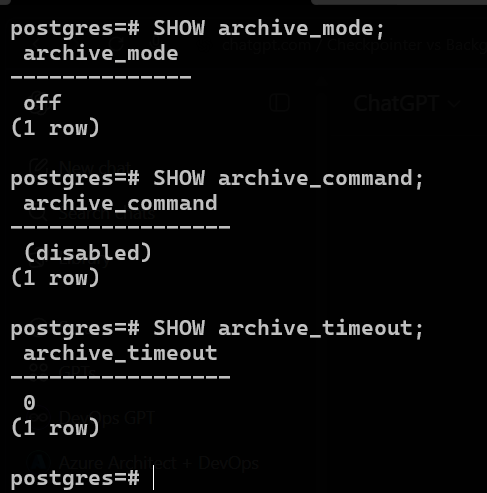
Why WAL archiving matters
WAL contains all changes made to the database.
Without archiving:
Old WAL files may be recycled or lost after checkpoints.
You cannot restore to a point-in-time, only to the last full base backup.
With archiving:
Every WAL segment is copied to a safe location (archive) before it’s recycled.
You can restore the database to any point in time using base backups + WAL archive.
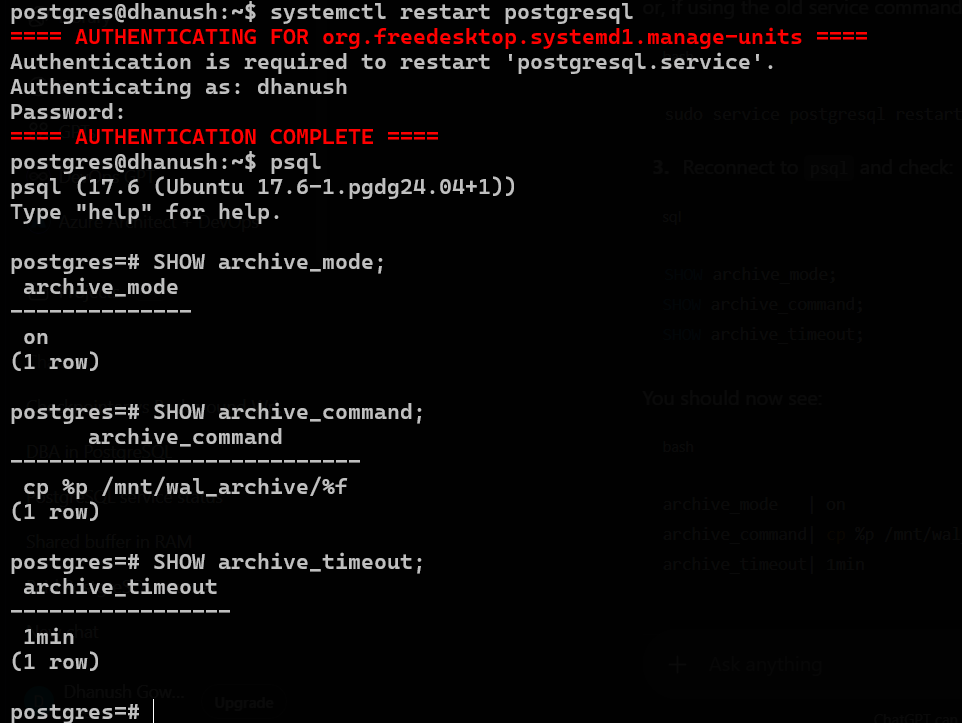
Recommended setup

- Enable WAL archiving
ALTER SYSTEM SET archive_mode = on;
- Set archive_command → copy WAL files to safe storage (disk, NAS, S3, etc.)
ALTER SYSTEM SET archive_command = 'cp %p /mnt/wal_archive/%f';
%p= path to WAL file%f= WAL filename
- Optional: Set archive_timeout
ALTER SYSTEM SET archive_timeout = '60s';
- Ensures WAL segments are archived even if low activity
- Reload PostgreSQL
SELECT pg_reload_conf();
Result
WAL files will be safely copied to archive before being recycled.
You can combine base backup + WAL archive for point-in-time recovery.
Checkpoints will continue working normally; WAL is just archived instead of lost.

1️⃣ WAL in pg_wal
    000000010000000000000004
    000000010000000000000005
    000000010000000000000006
    000000010000000000000007
    archive_status
    summaries
These are current WAL segments PostgreSQL is writing to.
.donefiles inarchive_statusindicate successful archiving:
    000000010000000000000004.done
    000000010000000000000005.done
    000000010000000000000006.done
    000000010000000000000007.done
- Once a WAL segment is copied to the archive, PostgreSQL marks it as
.done.
2️⃣ WAL in /mnt/wal_archive
    000000010000000000000003
    000000010000000000000004
    000000010000000000000005
    000000010000000000000006
    000000010000000000000007
This is your archived WAL folder.
WAL segments appear here after PostgreSQL successfully copies them.
This folder is now your PITR / backup WAL store.
3️⃣ What this shows
Archiving is fully functional.
PostgreSQL keeps writing WAL segments, checkpoints flush pages, and archived WALs are safely stored.
archive_statusis now just a “marker” folder;.donefiles show segments are archived.You can now simulate crashes and perform PITR using
/mnt/wal_archive.
WAL Writer
Runs continuously too, separately from background writer.
Its main job is to flush WAL buffers to disk.
WAL buffers store all changes before they’re written to data files, so WAL writer ensures durability.
Controlled by parameters like
wal_writer_delay(default 200ms).
Think of it as someone making sure the journal/log is always safely stored, while the background writer handles the “actual pages” in memory.
| Component | Works on | What it writes | Purpose |
| Background writer | Dirty data pages in shared buffers | Data pages from memory to disk | Keeps pages clean, reduces checkpoint load |
| Checkpointer | Dirty data pages | Data pages from memory to disk | Ensures all dirty pages are on disk for crash recovery |
| WAL writer | WAL buffers | WAL logs (Write-Ahead Log) | Ensures all changes are safely logged before data pages are written — guarantees durability |
Pages = actual database blocks (8 KB each) in memory.
WAL = sequential log of every change (insert, update, delete, DDL) stored in memory buffers first, then flushed to disk by WAL writer.
So, WAL writer works in parallel to page writes — its job is logging
MVCC
1️⃣ MVCC (Multi-Version Concurrency Control)
Every row has
xmin(creator transaction) andxmax(deleter/updater transaction).Deletes or updates don’t immediately remove rows; old versions remain until vacuumed.
This allows concurrent reads and writes without locking the table.
2️⃣ Transactions
Changes (INSERT, UPDATE, DELETE) are only visible after the transaction commits.
Uncommitted changes are invisible to other transactions.
PostgreSQL uses transaction IDs (XIDs) to track visibility.
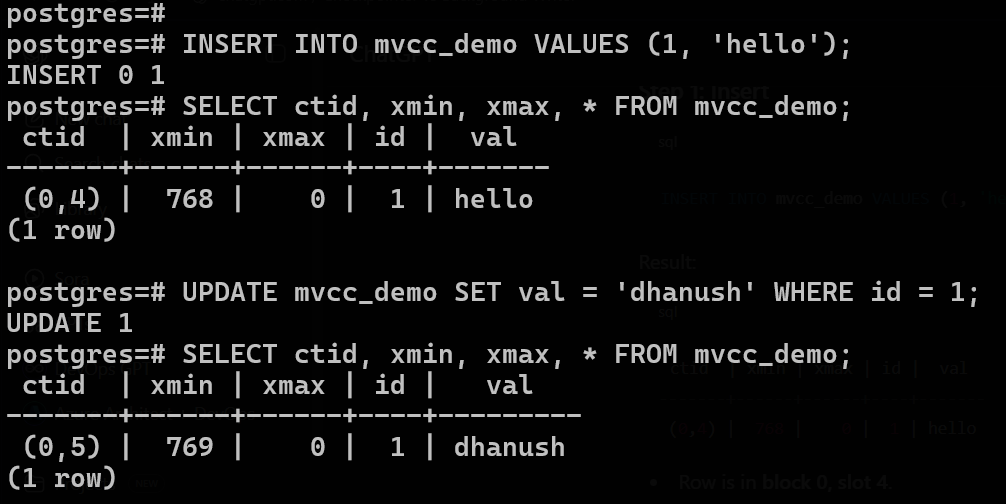
1. ctid – Tuple Identifier
Full form: Current Tuple ID
Definition: A system column in every PostgreSQL table that uniquely identifies the physical location of a row within a table.
Format:
(block_number, tuple_index)block_number → The page number (data block) in the table file on disk.
tuple_index → The index (slot) of the tuple within that block.
👉 Example:(0,4) means:
Row is stored in block 0 (first page of the table).
At offset 4 (5th slot, since offset starts at 0).
🔹 2. xmin – Insert Transaction ID
Definition: The transaction ID (XID) that created/inserted the row.
Used by MVCC to determine whether a row is visible to a transaction (depending on snapshot isolation).
👉 Example:xmin = 768 → Row was created by transaction with ID 768.
🔹 3. xmax – Delete/Update Transaction ID
Definition: The transaction ID that deleted or updated the row.
Default = 0 → means the row is still “alive” (not deleted/updated).
When a row is updated, the old tuple’s
xmaxis set to the new transaction ID, and a new tuple is inserted with a newxmin.
👉 Example:xmax = 0 → row is valid.
If xmax = 769 → row was deleted/updated by transaction 769.
🔹 VACUUM
Manual command: you (the DBA) run it.
Purpose:
Cleans up dead tuples (rows that were deleted or updated).
Prevents table from growing forever.
Reclaims space and makes it available for reuse.
Example:
VACUUM my_table;Runs only once when you execute it.
🔹 AUTOVACUUM
Background process (a daemon) that PostgreSQL runs automatically.
It periodically runs VACUUM (and sometimes ANALYZE) on tables based on activity.
Prevents you from having to manually vacuum every table.
Triggered when the number of dead tuples in a table crosses a threshold, controlled by these parameters:
autovacuum(on/off, cluster-wide switch)autovacuum_vacuum_thresholdautovacuum_vacuum_scale_factorautovacuum_naptime(how often it wakes up)
🔹 Key Difference
| Feature | VACUUM (manual) | AUTOVACUUM (automatic) |
| Who runs it? | DBA/user | Postgres background worker |
| When? | Only when you call it | Periodically, when thresholds are crossed |
| Control | Full (you decide when and how) | Limited (automatic, based on config) |
| Usage | Good for one-off cleanup or heavy operations | Good for continuous maintenance |
🔹 Practical Notes
Autovacuum is usually enough in production.
But as a DBA, you may still need manual VACUUM when:
After massive deletes/updates.
Before taking a pg_dump for backup.
If performance drops due to bloat.
👉 So in short:
VACUUM = you do it manually.
AUTOVACUUM = Postgres does it automatically in the background.

| Column Name | Meaning | Example Value | | --- | --- | --- | | relname | The table name. In this case, the table being monitored is
mvcc_demo. |mvcc_demo| | n_live_tup | Approximate count of live tuples (rows) currently visible to queries. |3| | n_dead_tup | Approximate count of dead tuples (rows marked for deletion/updates but not yet cleaned up). |6| | last_vacuum | Timestamp of the last manualVACUUMperformed on this table. Empty if none done. | (empty) | | last_autovacuum | Timestamp of the last automatic vacuum run by PostgreSQL’s autovacuum daemon. Empty if none. | (empty) | | vacuum_count | Number of times a manual vacuum has been run on this table since stats were last reset. |0| | autovacuum_count | Number of times autovacuum has been run on this table since stats were last reset. |0|
The table
mvcc_demohas 3 live rows and 6 dead rows.No manual or autovacuum has run yet (
last_vacuumandlast_autovacuumare empty).Both vacuum_count and autovacuum_count are
0, meaning the dead tuples are still in the table.Dead rows will keep accumulating until
VACUUMor autovacuum cleans them up.
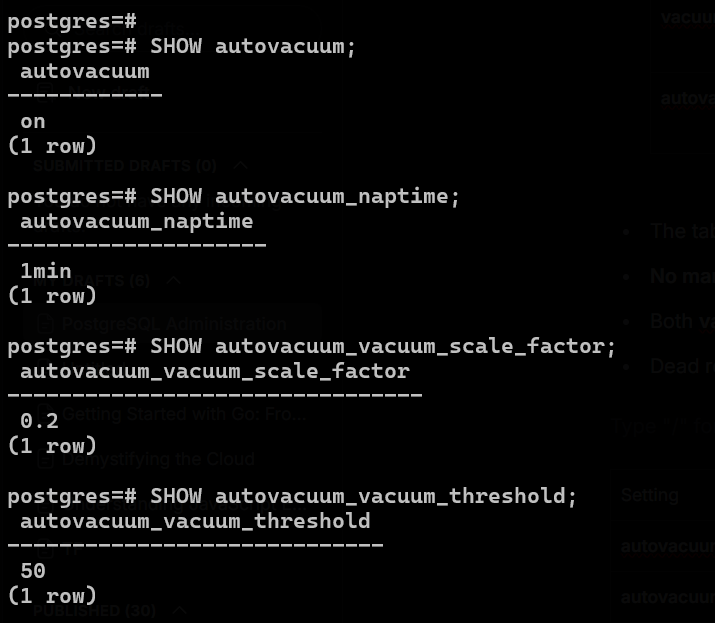
| Setting | Value | Meaning |
| autovacuum | on | Autovacuum daemon is enabled. |
| autovacuum_naptime | 1min | Daemon wakes up every 1 minute to check tables. |
| autovacuum_vacuum_scale_factor | 0.2 | Autovacuum triggers when dead tuples > 20% of table size. |
| autovacuum_vacuum_threshold | 50 | Autovacuum triggers only if there are at least 50 dead tuples in the table. |
🔹 Formula for autovacuum trigger
Postgres uses this formula per table:
autovacuum_trigger = autovacuum_vacuum_threshold
                     + (autovacuum_vacuum_scale_factor × n_live_tup)
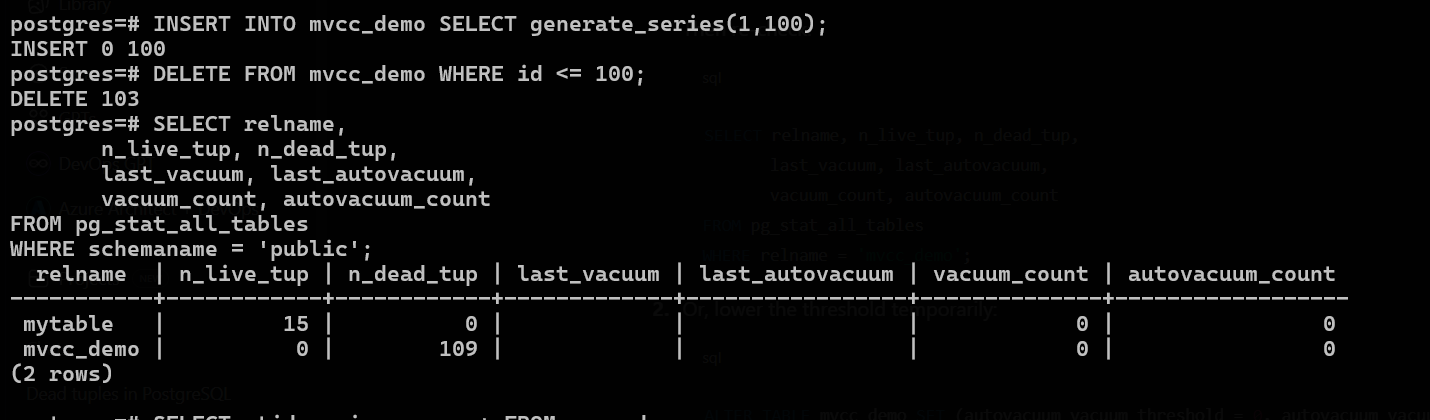
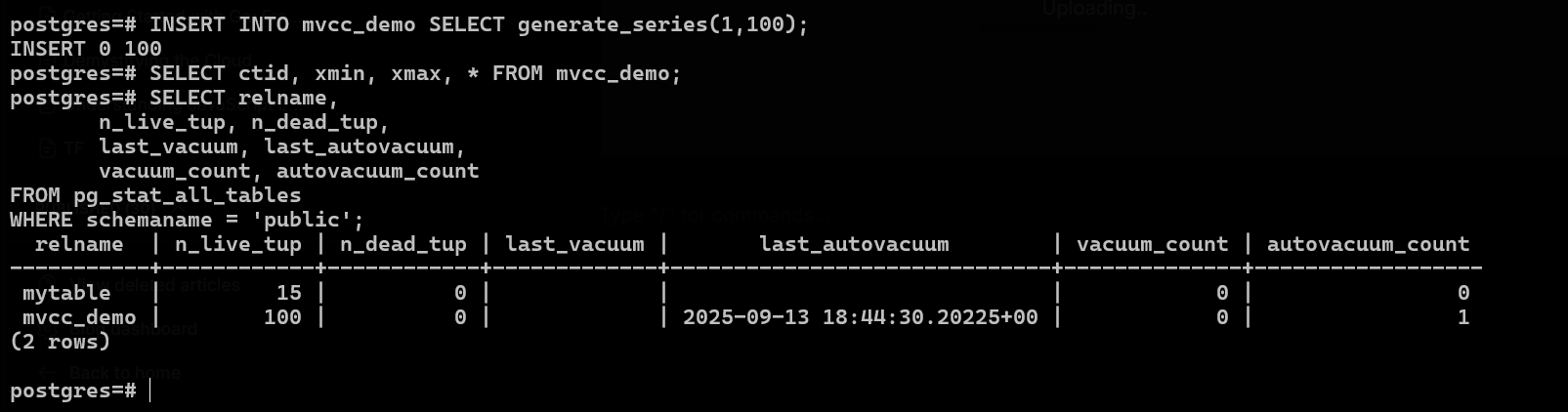
Why autovacuum ran now
Before this insert, the table had 109 dead tuples from the previous delete.
Autovacuum noticed the dead tuples exceeded the threshold.
It ran automatically and cleared them.
After autovacuum finished, the table was empty of dead tuples (
n_dead_tup = 0).
Key points to remember
MVCC keeps old/dead tuples until vacuum runs.
Autovacuum automatically triggers based on thresholds, cleaning dead tuples so the table doesn’t bloat.
When you insert new rows,
n_live_tupincreases,n_dead_tupstays 0 unless you delete/update rows.You can manually VACUUM a table if you want to clean dead tuples immediately.